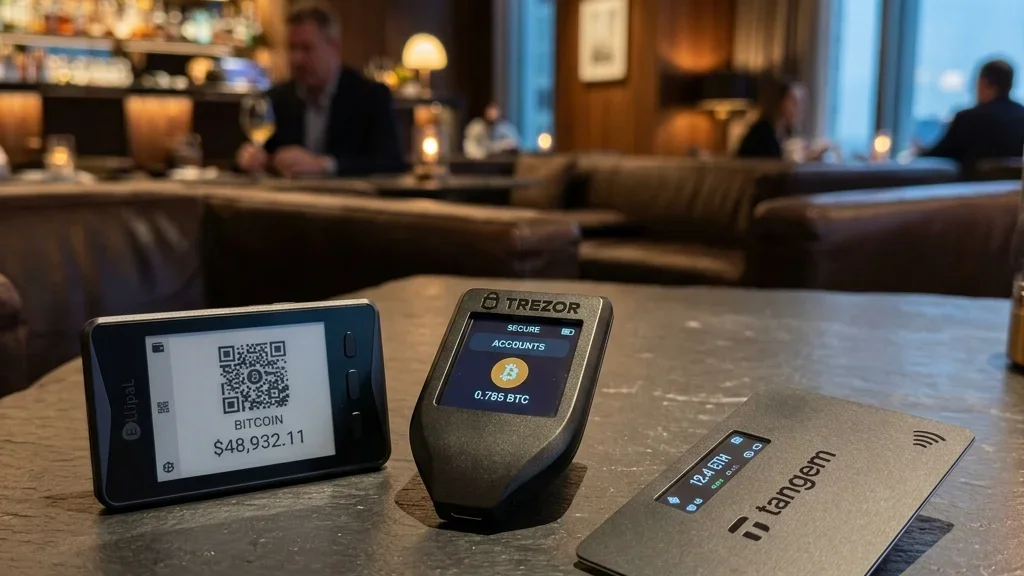

An in-depth review of the leading cold storage solutions optimized for international transit, physical security, and advanced duress protection.
1. Why Travelers Need Specialized Hardware Wallets in 2026
The cryptocurrency market in 2026 is larger and more integrated into global finance than ever before.
With this growth comes a rise in sophisticated physical and digital threats targeting mobile Web3 investors.
While holding your assets in a hot software wallet on your phone is convenient for small daily purchases, it is unsafe for your main portfolio.
A hardware wallet, or cold storage device, is essential to keep your private keys isolated from internet-connected devices.
However, not all hardware wallets are designed with the traveler in mind.
A traveler has different requirements than someone storing a device in a home safe.
As a global traveler, you need a device that is easy to carry, discreet, and resilient against physical tampering.
Crucially, you need advanced software features like duress PINs, hidden wallets, and air-gapped communications to handle potential inspections at border crossings and airports.
Let's look at the key travel-focused security features you must consider before choosing your next hardware wallet.
2. Key Travel Security Features to Look For
When reviewing hardware wallets for travel, look beyond basic coin compatibility and consider these specific security features.
Secure Element (SE) Chips
The Secure Element is a dedicated, tamper-resistant microchip that protects your private keys.
It is designed to withstand physical attacks, such as side-channel analysis or micro-probing, which attempt to extract keys directly from the hardware.
Look for chips with an Evaluation Assurance Level (EAL) rating of 5+ or 6+, which represents military-grade security.
Avoid devices that do not use a dedicated Secure Element, as they are vulnerable to physical extraction if stolen by a skilled attacker.
Air-Gapped Operation
An air-gapped device never connects directly to a computer or smartphone via a physical cable, Bluetooth, or NFC.
Instead, it communicates using QR codes scanned by a built-in camera, or via a MicroSD card.
This absolute separation prevents any malware on your phone or laptop from interacting with the wallet's firmware during transaction signing.
It also makes the device look less like an IT accessory during airport scans.
Duress PINs and Hidden Wallets
If you are forced by physical coercion or legal demand to unlock your device, you need a way to protect your main assets.
Many wallets support the BIP-39 passphrase standard, which allows you to create a hidden wallet by appending a custom word to your seed phrase.
By setting up a secondary PIN that opens a decoy account containing a small, believable balance, you can comply with demands while keeping your primary assets hidden in a separate cryptographic partition.
3. In-Depth Review of the Top 5 Wallets for Travelers
Here are the top five hardware wallets in 2026, evaluated for travel usability, security, and stealth.
1. Ledger Flex
The Ledger Flex is a modern, compact wallet featuring an E Ink touchscreen display.
It connects to your smartphone or laptop via secure Bluetooth or NFC, making it easy to sign transactions on the go without carrying cables.
It uses a certified Secure Element chip to protect your keys.
Traveler Pros: The E Ink display is highly readable in direct sunlight, and the slim form factor fits easily in a passport holder or card wallet. NFC support allows for fast, cable-free interactions with your mobile phone.
Traveler Cons: Bluetooth and NFC features can be disabled for safety, but their presence may concern users seeking a fully air-gapped setup. The brand recognition of Ledger means border agents are more likely to recognize the device.
2. Trezor Safe 5
The Trezor Safe 5 is the flagship open-source hardware wallet.
Unlike previous models, the Safe 5 includes a secure element chip while keeping its firmware open-source, providing a strong balance of physical security and transparency.
It features a color touchscreen and a MicroSD card slot for encrypted backups.
Traveler Pros: The open-source code allows you to verify that there are no hidden backdoors in the system. MicroSD backup is highly convenient for travelers who do not want to carry paper seed sheets.
Traveler Cons: The device connects via USB-C, requiring you to carry a data cable. The design is somewhat bulky and easily recognized as a crypto hardware wallet.
3. Keystone 3 Pro
The Keystone 3 Pro is designed for high-security, air-gapped operation.
It features a large 4-inch color touchscreen, a built-in high-definition camera for scanning QR codes, and a fingerprint scanner for biometrics.
It uses three distinct Secure Element chips to isolate and protect your data.
Traveler Pros: Fully air-gapped QR code communication means there is zero risk of USB port attacks. The biometric fingerprint scanner ensures that even if someone steals the device and knows your PIN, they cannot unlock it. It supports up to three separate seed phrases, allowing for advanced decoy configurations.
Traveler Cons: The device is larger than its competitors, resembling a small smartphone, which makes it less discreet to carry in a pocket.
4. BitBox02 (Multi Edition)
Produced in Switzerland by Shift Crypto, the BitBox02 is a minimalist hardware wallet that looks like a standard USB flash drive.
It features an invisible touch-slider interface on the sides of the device and a small, crisp screen.
It uses a dual-chip architecture to combine open-source firmware with a secure element chip.
Traveler Pros: Outstanding stealth design. When plugged into a laptop, it looks like a normal USB drive, minimizing interest from airport security. It backs up your seed phrase automatically to a MicroSD card, which you can hide separately in your luggage.
Traveler Cons: The screen is small, which makes verifying long addresses more difficult. It lacks wireless connectivity, requiring a direct USB-C connection to your phone or laptop.
5. OneKey Pro
OneKey Pro is an ultra-thin, smartphone-style hardware wallet that is popular for its seamless integration with mobile software wallets.
It uses an open-source design combined with a Secure Element chip and supports Bluetooth, USB, and QR code communication modes.
Traveler Pros: The device is extremely thin, making it easy to slip into a hidden pocket. The user interface is polished and integrates well with popular Web3 browser extensions and mobile apps.
Traveler Cons: Multiple connectivity features (Bluetooth, USB, QR) increase the attack surface if the device's firmware is compromised. Like the Ledger and Keystone, it is clearly identifiable as an electronic asset.
4. Comparison Table: Top 5 Hardware Wallets
This comparison table summarizes the technical specifications and travel suitability of each device.
| Wallet Model | Secure Element | Connectivity | Open Source | Travel Stealth | Key Travel Feature |
|---|---|---|---|---|---|
| Ledger Flex | Yes (EAL6+) | NFC, Bluetooth, USB-C | Partially | Moderate | E Ink Screen / NFC Signing |
| Trezor Safe 5 | Yes (EAL6+ opt) | USB-C | Fully Open | Moderate | MicroSD Encrypted Backup |
| Keystone 3 Pro | Yes (Triple SE) | QR Code (Air-gapped) | Partially | Low (Looks like phone) | Biometrics & Decoy Seeds |
| BitBox02 | Yes (Dual-Chip) | USB-C Plug | Fully Open | Very High | Invisible USB Flash Form Factor |
| OneKey Pro | Yes (EAL6+) | Bluetooth, QR, USB-C | Fully Open | High (Ultra-thin) | Multi-mode connectivity |
5. Safe Procurement and Shipping to Remote Locations
A major risk for travelers is purchasing a hardware wallet while on the road.
Supply chain attacks occur when an attacker intercepts a wallet during shipping, installs malicious firmware or tampers with the hardware, and repackages it.
When you unlock the device, it uses the compromised firmware to send your assets to the attacker.
Rules for Safe Procurement
- Only Buy Direct: Never buy a hardware wallet from Amazon, eBay, or third-party resellers. Only order directly from the manufacturer’s official website.
- Use Secure Delivery Locations: If you are staying in a hotel or temporary rental, ship the device to a secure courier pickup point (like a DHL or FedEx service point) where you must show ID to retrieve it, reducing the risk of local mail tampering.
- Inspect the Packaging: When the package arrives, inspect the box, security seals, and the device itself for any signs of opening or modification.
- Verify the Firmware: When you connect the device for the first time, the official companion app will run a cryptographic check to verify that the firmware is genuine and has not been altered.
6. Travel Checklist: Preparing Your Wallet for the Airport
Before you arrive at the airport terminal, prepare your hardware wallet to ensure it does not attract attention or expose your assets.
- Activate your Decoy Wallet: Ensure your duress PIN is set up and working. Put a small, realistic amount of crypto in the decoy account to show if forced to unlock the device.
- Disable Wireless Connections: Turn off Bluetooth and NFC features in your wallet settings.
- Pack the Device Discreetly: Place the device inside a small pouch with other electronic cables, chargers, and adapters. Do not keep it in your pocket or the front pocket of your carry-on bag.
- Hide Your Backups: If you are carrying physical backups (like a MicroSD card or a stealth metal card), store them in a different bag than the hardware wallet itself.
7. Conclusion: Choose the Right Shield for Your Journey
Securing your digital wealth while traveling requires a device that matches your lifestyle.
For absolute stealth, the Swiss-made BitBox02 is the top choice because it looks like a standard USB flash drive.
If you prefer a fully air-gapped setup with biometric security, the Keystone 3 Pro offers the strongest protection against physical threats.
For daily ease of use and mobile integration, the Ledger Flex and OneKey Pro are excellent options.
Evaluate your travel patterns, select the device that fits your needs, and configure your security features before your next flight.
Secure Your Assets with Ledger
Centralized exchanges and hot wallets are vulnerable to online threats. Keep your private keys physically isolated on a Ledger hardware wallet. Buy directly from the official store using our partner link to ensure device authenticity.
Get Your Ledger Securely →☕ Support Our Work
If you found this financial analysis valuable, you can support our independent research by sending a tip in USDT (TRC-20) to our secure cold storage address.